One paste from a full takeover: the ClickFix fake CAPTCHA that delivers the Ghost Agent stealer.
A small business website, hacked, showed its visitors a ClickFix fake CAPTCHA: prove you are human by pasting a command into Terminal. One paste would have handed an attacker, through the Ghost Agent infostealer, every password saved in the browser, every open session, the crypto wallets, the keyboard, the screen and the webcam. ByteMantle stopped it before the paste. Here is what was waiting on the other side.
In short
- A hacked website showed a fake "verify you are human" check that told visitors to press Windows + X, open Terminal, paste and press Enter. The page had already put a malicious command on the clipboard.
- ByteMantle replaced the command before it could be pasted and blocked the page. The attack ended there.
- Had it been pasted, the command would have switched off the Windows script scan, downloaded two loaders and started Ghost Agent, an information stealer with remote control: saved passwords, session cookies that bypass two-factor sign-in, crypto wallets and recovery phrases, keystrokes, screenshots, the webcam, and a hidden desktop for the attacker.
- The site took its lure from the same smart contract as the attacks in our previous article. In seventeen days that contract sent visitors to at least six different servers.
Hosts are defanged ([.] instead of the last dot) and commands are not reproduced, so that nothing here can be clicked or run. The hacked site belongs to a real business, a victim too: we show only part of its name.
The attack, and where it stopped
1. The ClickFix lure: a fake CAPTCHA that asks you to open Terminal
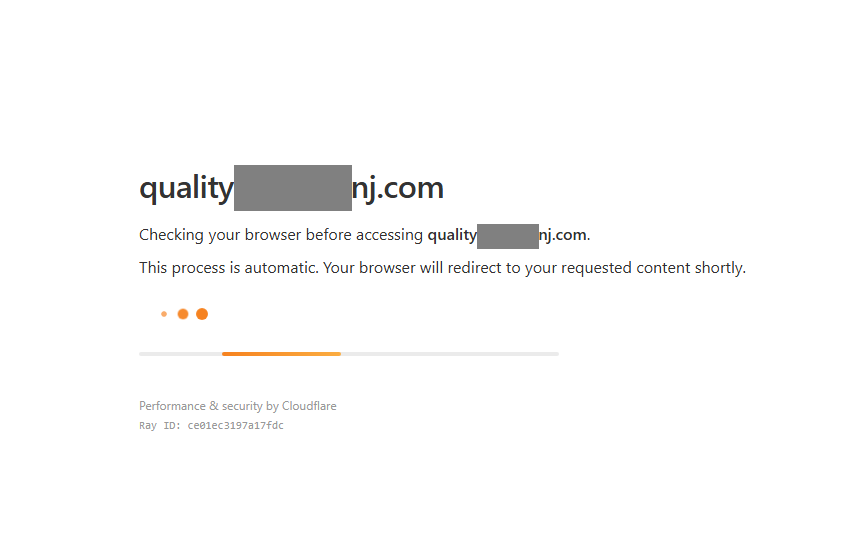
The site, quality…nj[.]com, belongs to a small cleaning company. For our research browser it first showed an automatic check that looks exactly like the one millions of sites use:
Then the real request appeared, dressed as "Additional Verification Required":
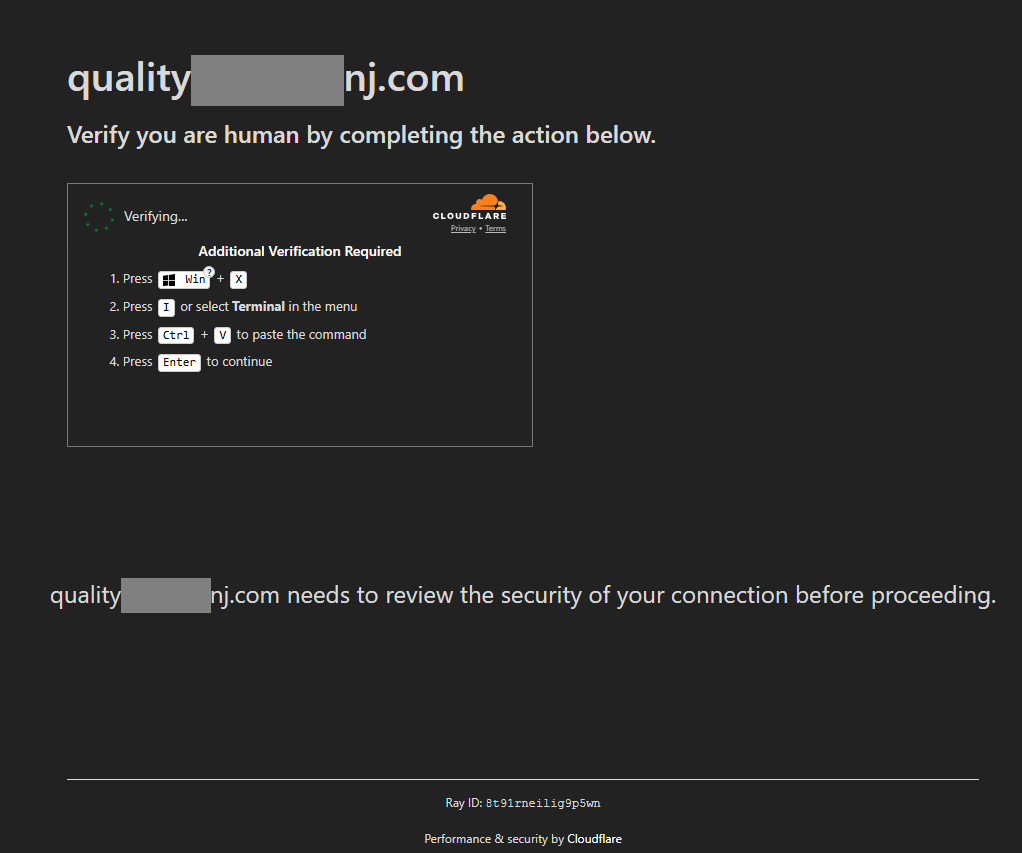
Windows + X opens a menu that leads straight to Terminal, a full command line, without the Run box that most warnings talk about. By the time this box appears, the command is already on the clipboard. The attacker does not need a flaw in the browser or in Windows: the visitor is asked to run the attack with their own hands, and a check that looks routine makes it feel safe.
2. Where ByteMantle stopped the attack
ByteMantle recognised the page for what it was: a fake verification that writes a command to the clipboard and tells the visitor to run it. Before anything could be pasted, it replaced the command with a harmless text, checked that the clipboard really held the safe text, and blocked the page:
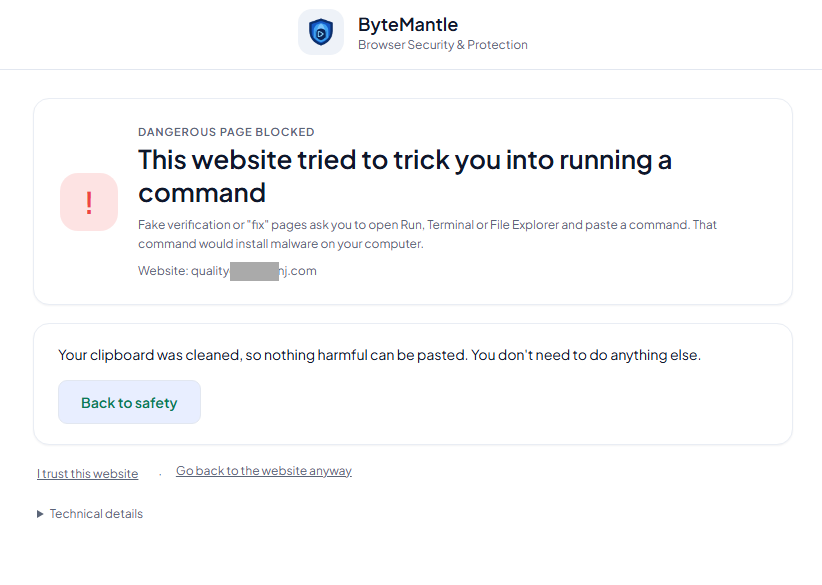
This is the only moment in the whole attack when everything is visible: the fake check, the instructions and the command are in the browser, in plain view. One step later, the attack is inside Windows, in memory, and built not to be seen. The rest of this article is about that later step: what the paste would have started.
This protection is free for everyone: get the ByteMantle extension for Chrome or Edge.
3. The PowerShell behind the command: switch off the alarm, then download
The command downloads a PowerShell script from tlschssl22read[.]cc. We opened that address separately, without running anything:
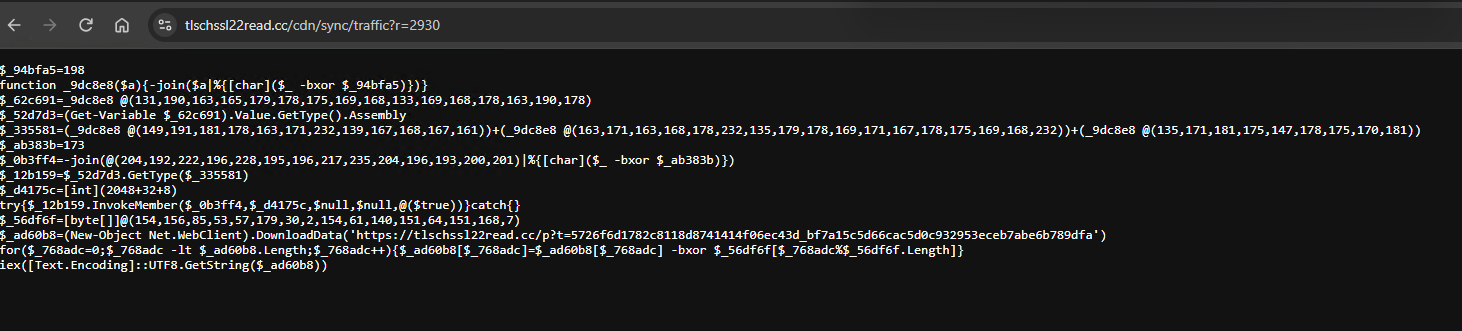
Written as numbers so that nothing readable gives it away, the script does four things, in this order:
- Turns off the alarm. It reaches into PowerShell's internals and tries to mark the Antimalware Scan Interface (AMSI), the check Windows and antivirus products run on every script, as broken, so that what comes next is not scanned.
- Downloads the next stage from the same server.
- Decodes it with a 16-byte key, so that the download itself looks like noise.
- Runs it in memory, without ever writing it to disk.
The next stage: hide inside Windows, erase the traces
The same operation served the next stage from its previous server, tthcsslread21[.]cc, seen by ByteMantle the same day. We decoded a copy of it. It is a second PowerShell script, and it is where the attack goes from a command to a break-in:
- it downloads two encrypted files, waits a random one and a half to three and a half seconds, and decodes them;
- it injects the first one into a trusted Windows process,
RuntimeBroker.exe,sihost.exeortaskhostw.exe, and the second one into Explorer, so that the malware runs under the name of Windows itself, not as a new program anyone would notice; - it hides its own window and erases the history of the Run box, so that the command the victim pasted leaves no trace there.
4. Two loaders, then the Ghost Agent malware
We followed the chain through the files it leads to and analysed them without running them. Each layer exists to hide the next one:
- The first loader (injected into a Windows process) carries a second program inside it and loads it into memory by hand, the way Windows would, so that the inner program never exists as a file. It presents itself as "Osnu Sync".
- The second loader (injected into Explorer) finds the Windows functions it needs by fingerprints instead of names, so that no telltale name appears in it, and holds the malware encoded with a repeating key and compressed with a compression built into Windows (LZNT1).
- The malware, which calls itself
ghost_agent.exe: a 64-bit Windows program of 567,808 bytes. On 19 November 2026, only 11 of 71 antivirus engines on VirusTotal flagged it.
A security product that scans one file at a time sees a loader, not the stealer it carries. That is the point.
5. What Ghost Agent does to a computer
Ghost Agent is an information stealer and a remote-access tool in one. This is what its code is built to do once it runs:
It empties the browser: saved passwords from Chrome, Edge and Firefox
Ghost Agent reads the files where Chrome, Edge and other Chromium browsers keep saved passwords, cookies and form data, together with the key that protects them, including Chrome's newer "app-bound" protection; and the same for Firefox.
It walks past two-factor sign-in: session cookie theft
A stolen session cookie is a sign-in that already happened. With it, the attacker opens the victim's email, chat, cloud storage or admin console as if they were the victim, with no password and no code from the phone.
It goes for the money: crypto wallets and recovery phrases
It looks for the data of twelve browser wallets (MetaMask, Phantom, OKX Wallet, Coinbase Wallet, Trust Wallet, TON Wallet, Binance Wallet, Ronin Wallet, TronLink, Bitget Wallet, Venom Wallet and Sui Wallet) and carries the full list of 2,048 words used in recovery phrases, to find phrases saved anywhere on the disk. A recovery phrase is the wallet: whoever has it can empty it.
It keeps stealing: keylogger and clipboard watcher
A keylogger and a clipboard watcher catch the passwords typed after the infection, including the new ones a victim sets when they suspect something.
It watches: screenshots and webcam
Screen capture and webcam capture, on demand.
It hands over the computer: a hidden remote desktop
A hidden desktop (HVNC) lets the attacker work on the machine, with the victim's signed-in browser, while the victim sees nothing. A command fetches any file from the disk, up to 100 MB at a time.
It stays: persistence and process injection
It restarts at every sign-in, through the Windows Run key or a WMI subscription, and can hide inside another, legitimate process.
It reaches for the phone: Phone Link
It looks for the files where the Windows Phone Link app keeps messages, notifications and photos from a paired phone, where one-time sign-in codes often arrive. We have not confirmed that it sends them out.
Its command server is hidden on the blockchain
Ghost Agent talks to its server over an encrypted connection, and it finds that server by asking a second smart contract on Polygon, 0xb2A4EA70…987b, through public blockchain gateways. The attacker changes the address in the contract, and every infected computer follows: blocking one server does not cut it off.
6. What one paste costs a company
On a work laptop, the first minutes after the paste are enough for the passwords and session cookies of every service open in that browser: Microsoft 365 or Google Workspace, Slack or Teams, the CRM, the cloud console, the bank. Each stolen session is a door into the company that needs no password and no second factor. The keylogger then collects the passwords changed in panic, and the hidden desktop lets the attacker use the victim's own trusted machine to go further.
For a person, it is the email account that resets every other account, the wallet emptied with the recovery phrase, and a webcam that can switch on.
All of it depends on one thing: the visitor pressing four keys with the attacker's command on the clipboard. That is the step ByteMantle took away.
7. EtherHiding: seventeen days of one smart contract
The hacked site does not keep its lure. It asks a smart contract on Polygon for it, 0xb909956b…55c6, the technique explained in EtherHiding. It is the same contract as in Shown only to people. Here is what the browsers connected to the ByteMantle console saw of it:
- 2 November: the first site we saw reading this contract.
- 16 to 19 November: the cleaning company's site, again and again. It stayed hacked for at least four days, serving the lure to every visitor.
- Servers change, the path does not. On three hacked sites the attack code came from the same file,
/assets/vendor.min.js, first ontthcsslread21[.]cc, then ontlschssl22read[.]cc. The commands downloaded fromgithub[.]pw,webrtwtre22[.]cc,checkingrayid[.]comand, on 19 November,j7tracker.gb[.]net. With the two script hosts, that is at least six servers in seventeen days.
Seen from a block list, these are six unrelated addresses, each added after someone reported it, each replaced a few days later. Seen from the browsers, they are one operation: the same contract, the same file path, the same lure, a new server every few days. Protection that waits for addresses to be reported is always one server behind. Protection that recognises the lure itself, in the browser, works on the first visit to a server nobody has seen yet. One smart contract, a new payload server every few days describes the same pattern in another campaign.
Stormshield described in August 2026 a campaign called Slaiclind that combines ClickFix with EtherHiding on Polygon and ends in a stealer. The second smart contract Ghost Agent reads its server from, 0xb2A4EA70…987b, is the one Stormshield lists as that campaign's secondary contract. Our sample shares much of its code and behaviour with the published one, but it is not the same file: we call it Slaiclind-like, not a proven attribution.
Stay protected: you, your family, your company
Ghost Agent's operators change servers every few days, and the stealer itself was missed by 60 of 71 antivirus engines. What does not change is the moment the whole attack depends on: a page in your browser asking you to paste. ByteMantle stops exactly that moment, on the first visit, before anything can run.
- For you and your family: install the free ByteMantle extension for Chrome or Edge. It recognises fake verifications, replaces the attacker's command on the clipboard, blocks the page and tells you why. No account needed. How it protects you at home.
- For your company: start the free 14-day trial of the ByteMantle console. Deploy the extension to every browser with Intune, Group Policy or Google Admin, set one policy for everyone, and see every attempt as an incident: the hacked site, the smart contract, the command and the server it pointed to, with the campaign it belongs to. ByteMantle for business.
Things to take into consideration
- Everyone: no real verification asks you to press Windows + X, Windows + R, open Terminal or paste anything. If a page does, close it. Already pasted? What to do now.
- If someone pasted it: disconnect the computer from the network; from another device, change the passwords of every account used in that browser and sign out of all sessions; move crypto to a new wallet with a new recovery phrase; have the computer reinstalled, not just scanned.
- Website owners: look for scripts you did not add, especially ones that read from a blockchain; update WordPress, plugins and themes, and change the administrator passwords.
- Security teams: alert on PowerShell or Terminal started right after a browser session; on scripts that touch
AmsiUtilsoramsiInitFailed(script block logging, event 4104); on programs other than the browser reading the browser'sLogin Data,CookiesorLocal State; and on new Run-key entries or WMI subscriptions. Treat a browser ClickFix event followed by PowerShell as critical.
Questions and answers
What is a ClickFix attack?
A fake page, often a fake CAPTCHA or "verify you are human" check, that puts a command on your clipboard and tells you to paste it into the Windows Run box or Terminal. Pressing Enter runs the attacker's command on your computer. What is ClickFix? explains it step by step.
What is Ghost Agent?
Ghost Agent is the name the malware in this attack gives itself: an information stealer with remote access. It takes saved passwords, session cookies, crypto wallets and recovery phrases, records keystrokes, the screen and the webcam, and lets the attacker control the computer on a hidden desktop.
Would antivirus have stopped it?
Maybe not in time. On 19 November 2026 only 11 of 71 antivirus engines on VirusTotal flagged the Ghost Agent file, and the attack never writes it to disk as one file: it arrives encrypted, in layers, injected into Windows processes after the script scan was switched off.
How does ByteMantle stop ClickFix?
In the browser, before anything runs. ByteMantle recognises a page that shows a fake verification and writes a command to the clipboard, replaces the command with a harmless text, blocks the page and tells you why. It works on the first visit, even to a server nobody has reported yet. Get the free extension.
I pasted a command from a verification page. What now?
Disconnect the computer from the network, change your passwords and sign out of all sessions from another device, move crypto to a new wallet, and have the computer reinstalled. Already pasted? What to do now has every step.
Indicators
| Indicator | What it is |
|---|---|
tlschssl22read[.]cc | script host (/assets/vendor.min.js) and server of the PowerShell script of section 3 |
tthcsslread21[.]cc | earlier script host, same path; server of the second PowerShell stage and of the two encrypted downloads |
j7tracker.gb[.]net, checkingrayid[.]com, webrtwtre22[.]cc, github[.]pw | download servers named by the contract's lures |
0xb909956b9d716ddfdf6935115a8d6f6cb2e655c6 | Polygon smart contract the lure is read from |
0xb2A4EA7055b7E2A6B2d96502f0ff85024e72987b | Polygon smart contract Ghost Agent reads its command server from |
f9bfca8c0cc8935baab0d030136fece5b5a9a26839e7ef7acfd74c24e5e12bfb | second PowerShell stage, encrypted as downloaded (SHA-256) |
e120f2e8283bd5e472730626d64880df3417cd3d9f1cbd3a04cf91738bd19b52 | first encrypted download (SHA-256) |
1cad896832ec605c25e663b5b9863a6e24868f4d2c269f25a8ce6aa2f21fba16 | second encrypted download (SHA-256) |
c6ed70bcf932ddfcccb5b9b32ccbc328a1ad168e0de9a4321de4c4b54c5b1f3a | first loader, decoded (SHA-256) |
c5239bd942959d10cadb4803fac4fc88e29b015859a341208177ea42f87aad6e | "Osnu Sync" program carried inside the first loader (SHA-256) |
d5b698670cf50f8280b969a714e1a4e8cd17f58b89d592a7a03e778f8fec6b02 | second loader, decoded (SHA-256) |
fc997a63f0cfdd6b1eca22cf8157a6198d5a27f3880dafb128c558b036f274ca | ghost_agent.exe, the stealer (SHA-256) |
Global\{7A3B9C1E-4D5F-8E2A-B6C0-1F3E5D7A9B2C} | mutex name in Ghost Agent (stored as UTF-16 text) |
YARA rule for security teams
A hunting rule for this build of Ghost Agent: a Windows program under 1 MB that contains its mutex name and at least two of five strings tied to its hidden desktop, wallet theft, Chrome's app-bound keys, Phone Link and Firefox passwords. Three of the strings are stored as UTF-16 text in the sample, which is why they are declared wide ascii.
rule ByteMantle_GhostAgent_Slaiclind_Associated_Hunt
{
    meta:
        description = "Hunts for the recovered Ghost Agent / Slaiclind-associated PE"
        author = "ByteMantle Research"
        date = "2026-11-19"
        sha256 = "fc997a63f0cfdd6b1eca22cf8157a6198d5a27f3880dafb128c558b036f274ca"
        confidence = "medium; static string combination"

    strings:
        // UTF-16LE strings
        $mutex    = "Global\\{7A3B9C1E-4D5F-8E2A-B6C0-1F3E5D7A9B2C}" wide ascii
        $phone    = "phone.db" wide ascii
        $firefox  = "key4.db" wide ascii

        // ASCII strings
        $hvnc     = "HvncGetMsgProc" ascii
        $wallet   = "key-wallet-files" ascii
        $appbound = "app_bound_encrypted_key" ascii

    condition:
        uint16(0) == 0x5A4D and
        filesize < 1MB and
        $mutex and
        2 of ($hvnc, $wallet, $appbound, $phone, $firefox)
}
Read more
Stop these attacks before anything runs.
Free browser protection for everyone, in Chrome and Edge. One console for your whole company when you need it.