Your team sees what the browser saw.
The extension protects every user on its own. Connect it to the console and your IT or security team gets correlated incidents, the evidence behind them, and fleet-wide context — without deploying a new browser.
One incident per attack, not fifty alerts.
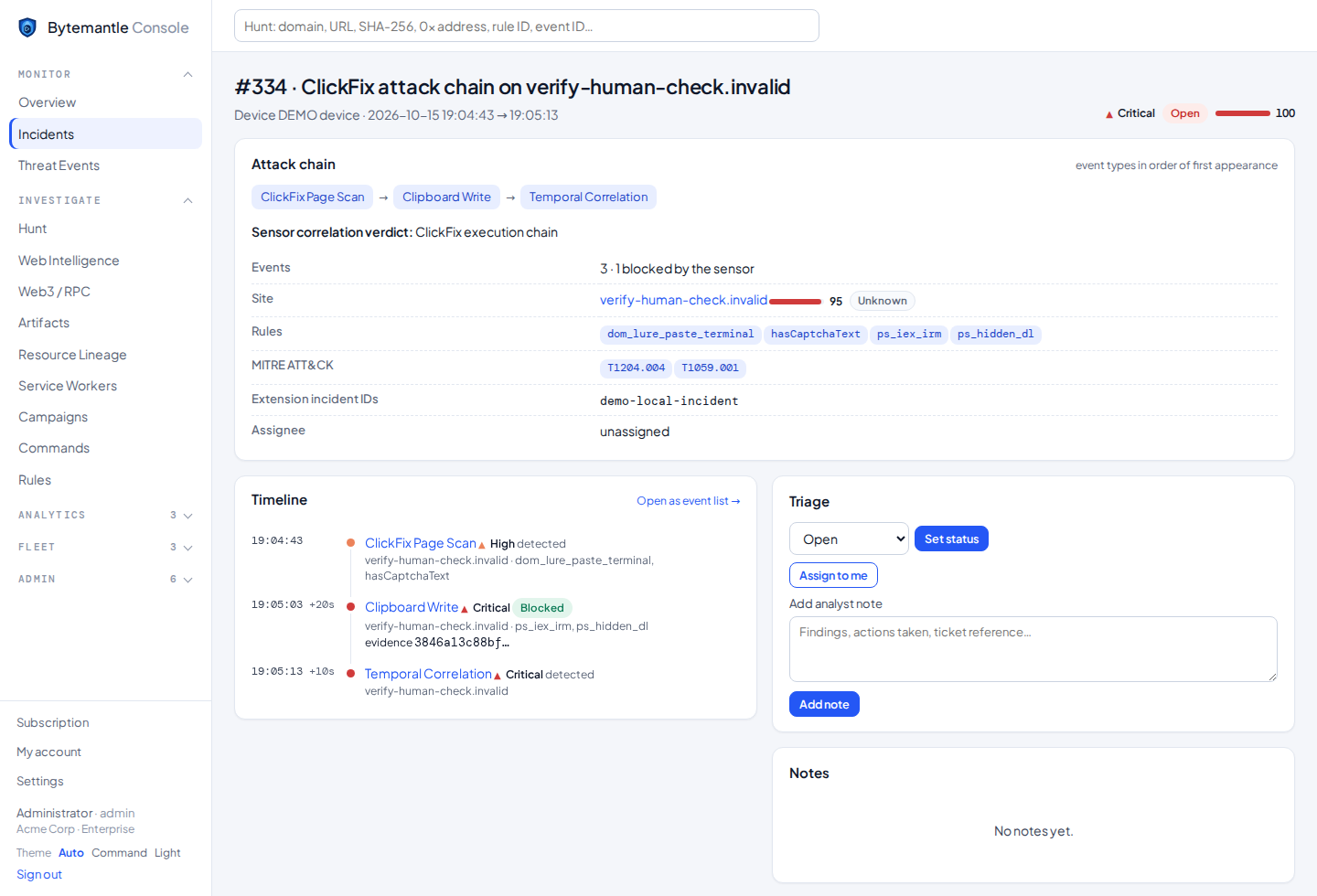
Events from the same device and site are grouped into an incident with a timeline, the matching rules, MITRE techniques and a verdict from the correlation engine.
- Attack chain in order of appearance
- Triage status, assignee and analyst notes
- Same site on other devices, at a glance
The command, not just “blocked”.
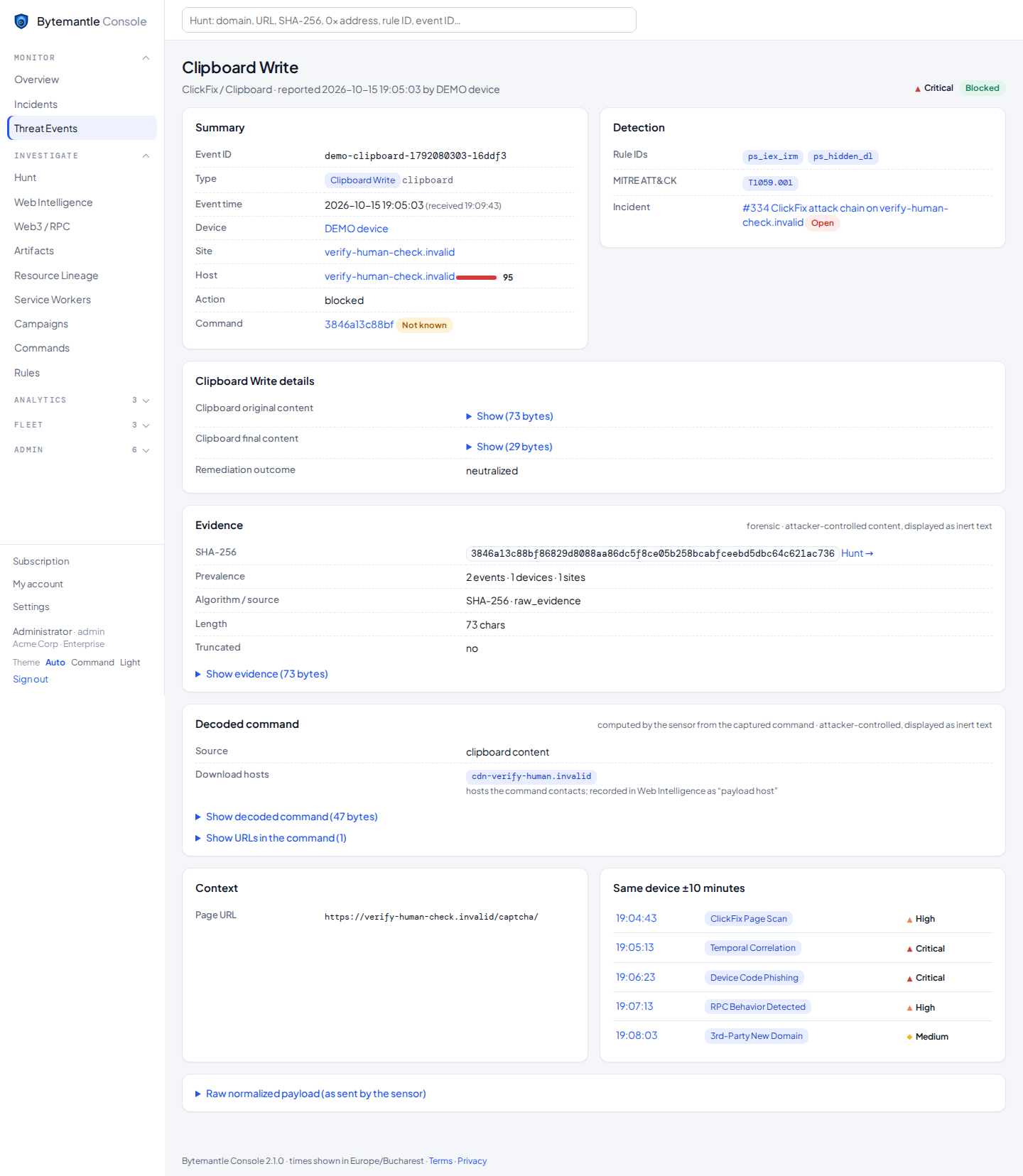
Every event keeps the evidence your team needs: the decoded command, what the clipboard was replaced with and whether that was verified, the SHA-256 and how many devices and sites saw the same payload.
- Evidence shown as inert text — never rendered
- Hunt by domain, URL, SHA-256, contract address or rule
- CSV export for reports and tickets
- Whole-incident export (PDF, JSON, text for AI) with your classification label
Built for a small team that has to cover everything.
Incidents & correlation
Grouped by device and site within 30 minutes, with the sensor’s own correlation verdicts merged in.
Intelligence
Risk score per domain from severity, sensor score, event types and the number of devices affected. Analysts can set a verdict.
Artifacts & hunting
Prevalence of each command and script hash across events, devices and sites.
Web3 & RPC
RPC endpoints, methods and intents, and the smart contracts your browsers talk to.
Devices & enrollment
Enrollment tokens per group, device health via heartbeat, versions and queue state.
Access & audit
Viewer, analyst and admin roles, two-step sign-in (it can be required for everyone), rate-limited sign-in and a full audit log.
Command Intelligence
Every command attackers tried to make your users run, decoded, grouped and searchable, with the sites and devices that met it.
Your own warning page
When something is blocked, users see your company’s name, message and IT contact, and can report it to IT in one click.
Groups & policies
Protections, rule modes (active, monitor, off) and per-site exceptions, set per group and pushed to the browsers.
Dashboards & reports
Ready-made dashboards, your own queries, and scheduled reports by e-mail with a PDF attached.
Read API
API keys with limits for your own tools and scripts (Enterprise).
Light and dark themes
A calm light theme for the office and a dark command-centre theme for the SOC, chosen per user.
Deploy in minutes
- Force-install the extension with Group Policy, Intune or the Google Admin console.
- Push the console address and an enrollment token as managed policy — users do nothing.
- Devices enroll themselves and events start flowing to your tenant.
Devices can also join from the extension’s settings with an enrolment token, and individual users can sign in with an account.
Integrations
- Splunk HTTP Event Collector
- Microsoft Sentinel (via Logic Apps)
- CEF lines over HTTPS
- Generic webhooks
- CSV export from every list
Forwarded events are minimized: the evidence travels as a SHA-256, never as text.
Questions teams ask
Do we need to replace our browser?
No. ByteMantle is an extension for Chrome and Microsoft Edge and works with your existing profiles and policies.
Does it replace our EDR?
No — it complements it. EDR sees the process after a command runs; ByteMantle sees the page, the clipboard and the lure before anything runs, and gives your EDR the exact command to hunt for.
Where is our data stored?
In the EU when we host the console, or on your own server if you run it yourself. See Trust & Privacy for exactly what is sent.
What happens if the console is unreachable?
Protection continues locally. Events are queued on the device and delivered when the console is back.
Want to see it on your own browsers?
Free protection for everyone; trials, proofs of concept and pilots for teams.